The monthly submission using i-Connect covers a wide range of data that you will previously have submitted on forms or spreadsheets. Once on-boarded, you will no longer need to use the P1 new starter spreadsheet to notify us of a new member joining the scheme.
You will no longer need to use the P5 changes in circumstances spreadsheet exception for interim address changes. If a member tells you they have moved house in between monthly submissions, we will still accept changes of address using the P5 spreadsheet. If you use the online return submission, you will also need to use the P5 to provide details of service breaks.
For leavers you will no longer need to use the P48 benefits on hold form. Instead a leavers spreadsheet should be completed and upload through our website every month. The members should also be marked as leavers on your i-Connect submission.
The table below shows what data is included in the monthly submission and explains how we use this.
| Data | What do we do with this? |
|---|---|
| New joiner/starter information |
|
| Changes in hours, service breaks, address changes |
|
| Pay and contribution data for the current pay period |
|
| Pay and contribution data for the financial year to date |
|
| Date of leaving and reason for leaving |
|
What isn’t included:
| Data/Information | What do I need to do? |
| Leaver information – if someone is leaving or retiring or an employee dies in service |
|
| Remittance advice (P8 form) |
|
To gather the data needed for your monthly submission, you will need to make sure that the extract is taken from your payroll system at the correct time in the payroll cycle.
We request that all monthly data is submitted in line with the deadline for payment of contributions each month which is the first of the month following the pay period. For example, if you pay on 15 November for the pay period from 1 November – 30 November, you will need to submit your November file by 1 December.
All employers are now asked to submit data every month to us using i-Connect. By the end of March 2020, all employers transitioned to this new method of data collection, with the Pensions Administration Strategy amended to accommodate the new procedures.
Before on-boarding, all employers must sign an employer compliance agreement. The purpose of this is to ensure that senior members of the organisation understand the importance of submitting correct and accurate data which complies with Local Government Pension Scheme (LGPS) regulations.
There are different roles which may be allocated in an employer organisation; these are outlined below.
Main authoriser
This is the individual who signed the employer compliance agreement before you were on-boarded. It will be your head of finance, chief executive, headteacher or equivalent. This person will have delegated authority to another named individual whom they authorise to control access and use of the i-Connect system within your organisation.
Delegated authority contact
This person has been authorised by the main authoriser and is named on the employer compliance agreement. They are responsible for controlling who within their organisation can access and use the i-Connect system and in what capacity. This person will also be the main point of contact for us for anything i-Connect or monthly data collection related.
Roles within i-Connect
Manager
If you are the delegated authority contact, you will have been set up on i-Connect with this role. You will be able to report, upload and set up additional users. You will not be able to set up additional managers. If you need an additional person to have this role you will need to contact our Employer Data team.
Reporter
With this role, you will be able to run reports within i-Connect and view the details of previous submissions. You will not be able to upload data unless you have also been allocated the ‘upload’ role.
Upload
With this role, you will be able to upload monthly data using i-Connect.
Our role at GMPF
We have a dedicated team to deal with data submitted through i-Connect and support employers in submitting this to us. This is our Employer Data team.
Each month the team carry out the following tasks:
- Checking that all employers have made their submission for the last pay period and chasing any that are outstanding.
- Reconciling data with payments made to the fund for that month.
- Checking data that has come through i-Connect to ensure it is reasonable and querying any anomalies with employers.
The links below are for guidance notes on how to use the i-Connect system.
- CSV submission through i-Connect – notes for guidance
- Online returns submission through i-Connect – notes for guidance
- Setting up new users – notes for managers
- i-Connect errors and suppressions guide
- Checks to make before uploading CVS file (single)
- Checks to make before uploading CVS file (MPP)
- CSV specification
- Multiple payroll provider CSV specification
- Checklist for March submissions
If you are submitting data using i-Connect forthe first time, the team are happy to talk you through the process on a call or a share screen webinar. If you would like to take advantage of this, please contact employerdata@gmpf.org.uk to arrange a suitable date and time.
These are some of the reasons or events that you would need to liaise with the team at GMPF concerning your monthly submissions of data:
- Data has been incorrectly submitted
- Payroll provider changes or taking payroll provision in house
- Transfer of staff to a new employer code e.g. TUPE
- Changes made to your CSV/data extraction process
- Pending termination as a GMPF employer/exiting the scheme.
It is important that you talk through any of these changes with our Employer Data team at the earliest opportunity to ensure that we can advise on the best route to take with your monthly submissions. Please call the team on 0161 301 7040 or email employerdata@gmpf.org.uk.
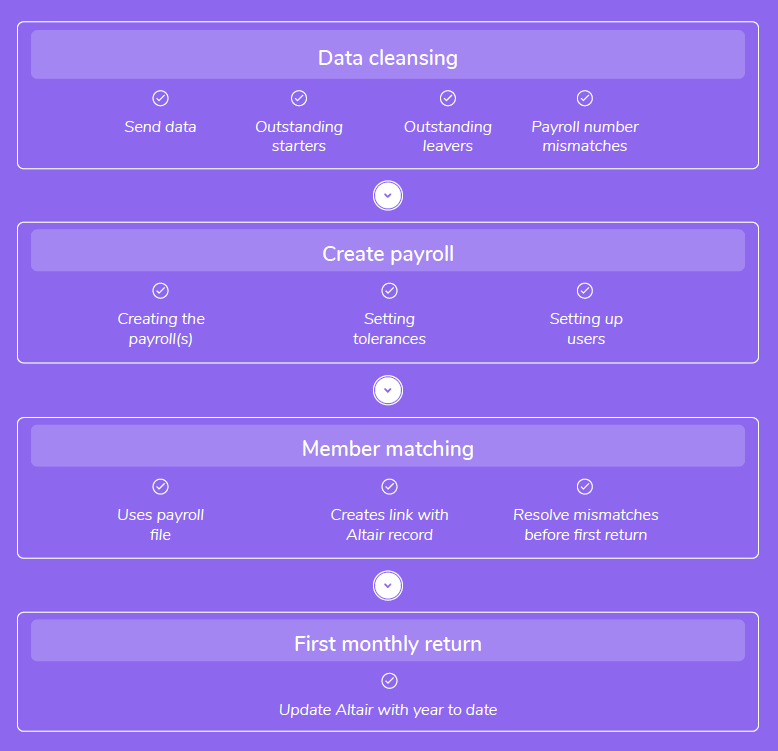
On-boarding is a process which encompasses several key tasks which are necessary before monthly submissions of data can be made. We will contact you to discuss the process and whether you will complete a CSV or online submission.
Employer compliance agreements
Before we can on-board you to i-Connect we must receive a signed employer compliance agreement from you as the employer and also from your payroll provider if they will be submitting data on your behalf. This ensures that we don’t require an annual sign off for data submitted throughout the year.
Within this agreement, a lead person must be named whom authority is delegated to. This person will be responsible for creating i-Connect accounts for others within the organisation and controlling the use of this.
Creating your CSV file extraction process
If you are going to use the CSV file submission option of i-Connect you will need to use the CSV specification to build the reporting routines you will need from your payroll system to extract all of the necessary data into the correct format. This can be quite a difficult process depending on the payroll system that you use and also the level of technical/IT resource that you have available.
Data cleansing
Once you are happy that you have a sufficient CSV file extraction routine or you have decided to use the online returns version of i-Connect, the next step is to carry out a data matching exercise with us. We will ask you to send us data relating to your active members and we will cross check this against our records and identify outstanding starters, leavers and any data mismatches such as payroll numbers.
We will then give you a set period of time within which to resolve these issues. The purpose of this is to achieve the best possible matching of members from your payroll system to i-Connect when you are on-boarding and reduce the number of errors that must be resolved at that point. It also ensures that no members are missed from your first monthly submission.
You must ensure that any data is sent to us securely. This can be done with WinZip or 7-Zip or by using our secure portal. For further information regarding sending encrypted data please contact the Employer helpline.
Setting up i-Connect
Once data matching is complete, we will ask you to send us the following information:
- Your first CSV file for the month within which you are on-boarding or a spreadsheet containing the required data for the online returns system.
- A year to date reconciliation of the data that you are submitting to us and the payments that you have made to GMPF since the start of the financial year (1 April).
- Contribution totals for any members who were in the scheme but left between 1 April and the pay period in which your on-boarding data relates.
- Your payroll period end date and the date that you would usually run your payroll each period.
We will then input information about the pay period that you will be transitioning within to i-Connect and set tolerances which will determine when you will be alerted of possible issues when submitting your returns.
Member matching
We will then use your first monthly file/data set and upload this into the i-Connect system. This creates a link for each member on your payroll file to a record on our system here at GMPF. This is the only time that your data will be matched with our data. For monthly submissions going forward it will simply match against the previous submission to identify changes. If there are any errors or mismatches at this stage we will work with you to resolve them.
First monthly submission
Once member matching is complete we will submit your first monthly data submission to i-Connect and all of your member records will be updated on our system here at GMPF. This is the end of the on-boarding process and we will let you know that everything is complete and provide you with guidance on when and how to submit your next monthly return.
Business as usual
After this it is over to you to ensure that you submit your file on time and every month, ensuring that you resolve any errors and that the data is accurate. Once submitted i-Connect will provide a breakdown of the totals entered and this should enable you to determine the amount of contributions that are due for that period.
Monthly data collection through i-Connect enables employers to submit their members’ data for each pay period, with cumulative amounts building up for the year.
The new pension year starts from April, so the cumulative amounts restart from April each year.
Where a member leaves or opts out of the pension scheme before April, you cannot submit any revised data for that member through i-Connect in the new year. This is because that member is no longer paying into the scheme, so should not be on your i-Connect file in the new year.
Some examples of when you may need to send revised data are:
- A member joined in February, but opted out within three months, so you refunded their contributions in April.
- A member left in March, but you paid their overtime in April.
- You have paid a backdated pay award to a member who left before April.
For this reason, we have devised previous years’ adjustments spreadsheets. These will enable us to correct the members’ pay and contribution data, as well as help you to balance the contribution payments you make.
There are two versions of the previous years’ adjustments spreadsheet:
- Version one – for use by employers submitting a csv file via i-Connect (the columns are in the same order as the csv file). Example.
- Version two – for employers submitting their files by manually updating the information online (the columns are in the same order as the year end returns submitted previously). Example.
We have also provided an example spreadsheet for each version, with explanations of how to record different types of adjustments.
Please send us your completed spreadsheet securely, along with the signed P9 which forms part of this.
If you have any questions, please email iconnect@gmpf.org.uk or phone 0161 301 7043.